Wanderlog - Trip Planner App
- 4.7
- Rating
- 1.00M
- Installs
- Free
- Price

 Analysis by App-foxy
I use Wanderlog when a trip starts as a messy collection of ideas rather than a finished plan. A restaurant saved in one message, a hotel confirmation in my inbox, a scenic stop mentioned by a friend, and a long list of places on a map can quickly become difficult to manage. This travel and local app brings those pieces into one itinerary, which is its biggest practical advantage. Instead of switching between a notes app, a map, booking emails, and a separate route planner, I can work from one trip workspace.
That approach makes Wanderlog - Trip Planner App especially appealing for road trips and multi-stop holidays. I can see the route, organize activities by day, and keep the plan close to the places I want to visit. It is free to download, rated for Everyone, and the developer is Wanderlog. The app has built a strong audience, with an average rating of 4.8 from around 30 thousand ratings and more than a million installs.
My overall impression is positive, but I would not call it the perfect travel tool for every traveler. It is strongest when several people are planning together or when a journey has enough moving parts to justify an itinerary. For a simple weekend with one hotel and two activities, a normal maps app and a notes page may be quicker. Wanderlog becomes more useful as the trip becomes more complicated.
You May Also Like

 Blood Strike: 2.5 Anniversary
Blood Strike’s Loadouts Turn Every Drop Into a Tactical Gamble
A close look at Blood Strike’s custom loadouts: how fast access to signature weapons reshapes its battle royale rhythm, rewards preparation, and narrows the gap between fights.

 Pandora - Music & Podcasts
Pandora’s Music Is Easy to Start, but Harder to Recover
Pandora’s strength is its low-effort path from a seed to a station. Its weak spot is how much confidence it asks you to place in connection, setup, and quiet recovery.

 8 Ball Pool
 Is Built on Rivalries, Rematches, and Routine
A close look at the rivalries, rematches, shared routines, and unanswered safety questions that turn a quick pool match into a persistent mobile community.

 Samsung Music
’s Quiet Strength Is Playing What You Already Own
Its reach comes less from spectacle than from dependable access to a personal library. That simplicity is both the app’s strongest retention engine and its ceiling.

 AccuWeather: Weather Radar
AccuWeather Review: A Quick, Clear Forecast for Everyday Decisions
For everyday plans, the best forecast is the one you can understand quickly. AccuWeather makes rain timing, radar, and local conditions easy to act on, with a few trade-offs.

 Hill Climb Racing
Why Hill Climb Racing Still Turns Crashes Into One More Run
A tiny car, a bumpy hill and one more upgrade: Hill Climb Racing keeps resurfacing because its simple chaos makes every near-miss feel personal.
More From Our News Desk



How the current app feels in everyday planning
I find Wanderlog most useful when a household’s travel plan is too involved to keep in one person’s head. A parent can sketch the route, while other travelers add ideas or flag stops they care about; the real benefit is having those choices gathered around the same itinerary rather than scattered through separate messages. That shared view also makes it easier to decide what should stay flexible before getting into the details of how each person uses the app.
A single workspace for scattered travel details
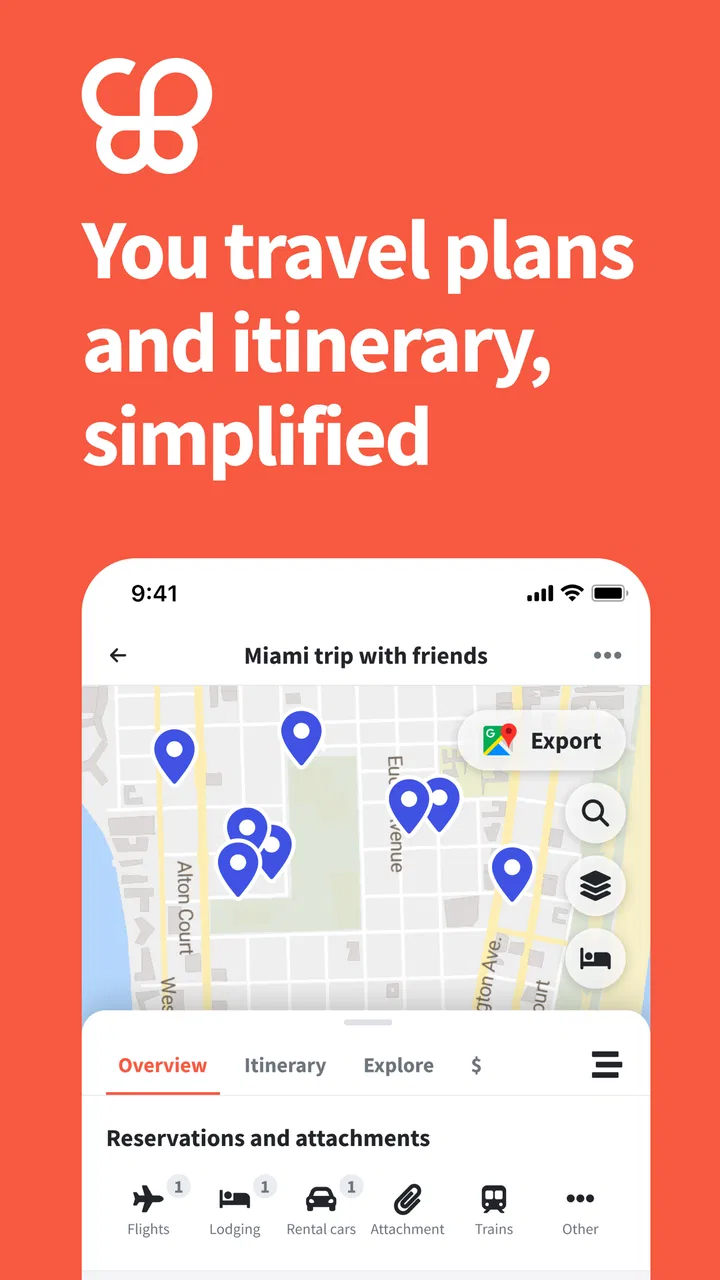
The first thing I noticed is that the app treats a trip as a living plan rather than a static list. I can create an itinerary, add destinations, arrange activities, and move between a schedule view and a map-oriented view. That matters because travel decisions are connected: adding a distant attraction can change the best order for the entire day, while adding a hotel can change how I judge every nearby stop.
In a conventional notes app, I would write “museum, market, dinner” and then open a separate map to work out where they are. Wanderlog makes that relationship easier to inspect. I can look at the places in the context of the route and decide whether an activity belongs on a particular day or should be saved for later. It does not remove the need for judgment, but it reduces the amount of mental sorting I have to do.
The map is most valuable before I leave home. I use it to spot clusters of places and avoid building a day that zigzags across a city. For a road trip, the same view helps me notice when a supposedly small detour is actually pulling the route away from the main direction. This is a more useful planning habit than simply collecting attractive places one by one.
A realistic use case: planning a group road trip
Imagine three friends planning a drive with several overnight stops. One person cares about viewpoints, another wants local food, and the third is focused on keeping the driving manageable. In a group chat, those preferences quickly disappear under messages and links. In Wanderlog, the group can put candidate stops into the same trip, discuss the order, and turn the useful suggestions into a day-by-day plan.
The important workflow is not merely adding locations. I would first collect every possible stop without trying to perfect the schedule. Then I would use the map to identify natural clusters, remove places that create unreasonable detours, and only afterward assign the remaining stops to days. This prevents the common mistake of filling each day with attractions before checking whether the route makes sense.
For a group, shared planning can also expose disagreements early. Someone may discover that a “quick stop” is far from the planned road, or that two activities compete for the same part of the day. That kind of friction is healthier during planning than on the morning of the trip. I still recommend confirming opening hours and reservation requirements separately, because an itinerary is an organizing tool, not a guarantee that every venue will be available.
Where it sits beside familiar alternatives
Google Maps or Apple Maps remain better for turn-by-turn navigation and spontaneous local searching. I would not replace them entirely with Wanderlog while driving. Their navigation experience is more natural when I need immediate directions, traffic context, or a quick search near my current position.
TripIt is a more natural fit for travelers who mainly want booking confirmations gathered into a chronological travel record. Roadtrippers is more focused on discovering and shaping road journeys. Wanderlog sits between those approaches: it combines itinerary organization with map-based planning and is useful beyond a single drive. That middle position is its strength, although it also means that someone seeking a highly specialized booking inbox or a pure navigation tool may find another app more focused.
A spreadsheet gives me complete control, but it requires manual upkeep and does not feel as connected to the map. A notes app is faster for rough ideas, yet becomes awkward once I need dates, locations, and route decisions to stay aligned. Wanderlog earns its place when I want structure without building the whole system myself.
Useful planning habits that are easy to miss
One of my favorite ways to use the app is as a decision filter rather than a final schedule. I add more possible places than I expect to visit, then compare them on the map. This makes it easier to keep a backup list without overloading the itinerary. The distinction between “must do” and “maybe” is important: a trip feels much less stressful when the plan leaves room for weather, tiredness, or an unexpectedly good neighborhood.
A second useful habit is to plan by geographic area before planning by clock time. I place nearby activities together, then consider realistic travel time and energy. This is particularly helpful in large cities, where a short distance on the map can still become inconvenient during a busy day. The app helps me see the spatial problem, but I still need to apply common sense about crowds, meals, rest, and transport.
A third workflow is to use the itinerary as a shared briefing before departure. Rather than sending a long message with every address, I can ask travel companions to review the days in order and flag what they care about. That turns the plan into a conversation. It also makes it easier to identify activities that need advance attention, such as timed visits or popular restaurants, without pretending that the app itself has solved those reservations.
What the version information suggests about its direction
The current version is 2.190, and the app has been available since August 21, 2019. Those details point to a product that has had time to mature rather than a brand-new experiment. In my experience, the interface reflects that maturity: the central idea is clear, and the main planning views support a real trip instead of only demonstrating a list of attractive places.
At the same time, a mature travel planner has to serve very different habits. Some people want a detailed schedule with every stop arranged; others want only a loose collection of ideas. The current experience is more rewarding for the first group, although the flexible collection approach helps bridge the gap. I would watch future updates for improvements that make switching between a rough wish list and a precise itinerary even smoother.
Version information is also useful when deciding whether to recommend the app to someone with an older phone. The minimum operating system is Android 8.0, so compatibility should be checked before planning a trip around it. That is a small step, but it is worth doing before a departure, when changing devices or moving plans to another service is inconvenient.
How existing users are likely to feel the evolution
For someone who has used Wanderlog for a while, the main benefit of continued development is not necessarily a dramatic new feature. It is the accumulation of small improvements that make adding, moving, and reviewing trip details less tiring. Travel planning involves repeated edits, so a minor reduction in friction can matter more than a flashy addition.
Existing users should still treat the app as a planning layer rather than the only source of truth. I would keep essential confirmations accessible, especially for transport and accommodation, and verify important details directly with the provider. That is not a criticism unique to Wanderlog; travel information changes, and an itinerary can only be as reliable as the details placed into it.
The free entry point makes it easy to test the workflow on a real upcoming trip instead of deciding from screenshots. There are in-app purchases ranging from $1.99 to $79.99 per item, so I would explore the free experience first and only pay if a particular premium capability genuinely improves the way I plan. The wide range means the cost can matter more to a frequent traveler than to someone organizing one uncomplicated holiday.
Where the app still demands patience
The biggest limitation is that organization can become another task. If I save every interesting place, the trip quickly turns into a crowded board of possibilities. Wanderlog helps me sort that material, but it cannot decide what I actually value or how much time I want to spend moving between locations. The app is most effective when I am willing to curate rather than endlessly collect.
There is also a difference between a visually sensible route and a comfortable day. A map can show that several locations are close, but it cannot fully capture queues, hills, weather, meal breaks, or the energy of a group. I use the map to challenge bad assumptions, not to create an overconfident minute-by-minute schedule. Travelers who prefer complete spontaneity may find the planning process unnecessary.
Another trade-off is the learning curve that comes with having more than one useful view. A basic notes app feels immediate because it asks almost nothing from me. Wanderlog offers more structure, but I need to understand how I want to organize places, days, and alternatives. Once that habit is established, the structure pays off; during a rushed last-minute plan, it can feel like extra setup.
People who mainly need live navigation should skip Wanderlog as their primary driving companion. I would prepare the itinerary there, then use a dedicated navigation app when the journey begins. Likewise, travelers who only want automatic handling of booking emails may prefer a service built around confirmations rather than destination planning. The right choice depends on whether the core problem is “Where are my reservations?” or “How do I make all these places fit together?”
Privacy, connectivity, and practical preparation
Before a trip, I would open the itinerary and make sure the important information is easy to reach. I would also keep backup access to booking confirmations and addresses instead of assuming that one app should carry every essential detail. Connectivity can be inconsistent during travel, and careful preparation is more dependable than discovering a limitation at the roadside.
I would also avoid treating saved places as personal recommendations that have already been checked. A place can look perfect on a map and still be closed, fully booked, or unsuitable for the group. My practical routine is to use Wanderlog for collection and arrangement, then verify the few high-priority stops through their current official information before departure.
For families, the Everyone content rating makes the app broadly approachable, but that does not mean every itinerary will suit every age. Parents still need to judge distances, meal timing, and activity intensity. The app can make those choices visible to the group; it cannot make them on the family’s behalf.
Who should use it, and who should pass
I recommend Wanderlog to travelers who enjoy having a clear overview, couples balancing different interests, families coordinating several stops, and friends planning a road trip together. It is especially useful when the route matters as much as the destinations. If I have several cities, multiple activities, and a need to compare alternatives, the app gives me a much better working surface than a chat thread.
I would be less enthusiastic for someone taking a short, unstructured break with no reservations and no desire to plan. That person may get more value from a regular map and a few saved locations. I would also point frequent business travelers toward a booking-focused organizer if their priority is automatically collecting confirmations rather than designing days around places.
The app is free to start, which lowers the risk of trying it, but I would not purchase anything simply because a trip feels complicated. First, I would build one itinerary, invite the relevant people if collaboration is needed, and see whether the map and schedule actually reduce effort. If I still find myself duplicating everything in another tool, the paid options are unlikely to fix the underlying mismatch.
What I would watch in future updates
The most valuable future progress would be anything that keeps detailed planning from becoming heavy. I would like the experience to remain quick when I am only saving an idea, while still giving me enough control when I am arranging a complex route. That balance is difficult: too little structure makes the app feel like a list, while too much structure makes casual planning feel like administration.
I would also pay attention to how clearly the app separates confirmed plans from flexible ideas. That distinction affects real decisions, especially when a group is using the same itinerary. A clear way to show what is fixed, what is optional, and what still needs checking would make the existing planning concept even more useful without changing its basic purpose.
For current users, the sensible approach is to keep updating the app and judge changes by the time they save in actual planning, not by the number of new controls on screen. The version history shows an established product, but the best test remains personal: can I revise a day quickly, understand the route, and share the plan without explaining the whole system to everyone else?
My final take after using it
Wanderlog succeeds because it addresses a very ordinary travel problem: good ideas are easy to collect, but difficult to arrange. Its combination of itinerary building and map context helps me turn scattered possibilities into a route I can discuss and revise. That is more useful than a simple list, while remaining less specialized than a dedicated navigation or reservation organizer.
I would use it for a road trip, a multi-city holiday, or any group journey where location and order matter. I would not rely on it alone for live directions, changing travel conditions, or critical booking information. Used with that boundary in mind, it becomes a practical planning companion rather than an overloaded replacement for every travel app.
My recommendation is to try the free version with a real trip, not a fictional one. Add the places you genuinely want to visit, inspect their relationship on the map, arrange a day, and see whether the process makes decisions easier. If it does, Wanderlog can become the central workspace for your journey. If your travel style is deliberately spontaneous or your only need is reservation management, a simpler alternative will probably feel better.
FAQs for Wanderlog - Trip Planner App
01What is Wanderlog and how does it work?
Wanderlog is a comprehensive trip planning app designed to help travelers organize their itineraries. It allows users to collaboratively plan trips, manage reservations, and track expenses. With its intuitive interface, you can easily add destinations, activities, and notes, ensuring that your travel plans are streamlined and accessible anytime, anywhere.
02Is Wanderlog available on both Android and iOS?
Yes, Wanderlog is available for download on both Android and iOS platforms. This cross-platform accessibility ensures that users can plan their trips seamlessly, regardless of the device they are using. Simply visit the Google Play Store or Apple App Store to download and start planning your next adventure.
03Does Wanderlog offer offline access to trip details?
Absolutely. Wanderlog offers offline access to your trip details, which is incredibly useful when traveling to areas with limited internet connectivity. You can download your itineraries and access all your plans without needing a constant internet connection, making it a perfect companion for international travel.
04Can I collaborate with friends and family on Wanderlog?
Yes, Wanderlog supports collaborative trip planning. You can invite friends and family to join your trip, allowing them to add destinations, suggest activities, and manage travel plans together. This feature is perfect for group trips, ensuring everyone is on the same page and contributing to the itinerary.
05Are there any costs associated with using Wanderlog?
Wanderlog offers a free version with essential trip planning features. However, they also provide a premium subscription that unlocks additional features such as advanced map functions, unlimited PDF exports, and more. This premium option is ideal for users looking for enhanced functionality and more robust planning tools.
Pros
- User-friendly interface for easy navigation.
- Collaborative planning with friends and family.
- Offline access to maps and itineraries.
- Integration with Google Maps for detailed routes.
- Customizable itineraries to fit personal needs.
Cons
- Limited support for non-English languages.
- Offline access requires premium subscription.
- Some features locked behind a paywall.
- Occasional syncing issues with accounts.
- Limited integration with third-party apps.

Wanderlog - Trip Planner App
Gallery